Git常用指令
GIT
git commit -m<message> 创建新版本快照到仓库,Head一同移动,并添加信息
git commit --no-verify -m<message> 不进行代码风格验证

git branch <-b> <branch> 创建分支 参数-b   创建后将头指针移动到该分支

git branch -f <branch1> <branch2> 将branch1强制移动至 branch2处

git checkout <branch>  Head指向branch

git merge <branch> 将branch与Head指向快照合并

git rebase <branch> 将Head与branch公共父节点之前的版本逐个加入到branch中,并将Head移动到最新版快照

git rebase -i <branch> 将Head和branch公共父节点之前的版本交互式的加入到branch下

git checkout <branch>^ Head切换到branch的父节点

git checkout <branch>~4 Head切换到branch的向上4个节点

git reset <branch> 将本地Head回退到branch版本(远程无效,分支仍存在)

git revert <branch> 撤销更改到branch版本,并且在Head后创建新版本快照,该快照和branch相同,可以推送到远程仓库

git cherry-pick <branch>...  将branch复制到Head分支,并移动Head

git add <files> 将文件添加到暂存区

git push origin <branch> 将本地分支提交到origin地址的仓库

git restore <file> 表示将在工作空间更改但是不在暂存区的文件file撤销更改
使用逻辑
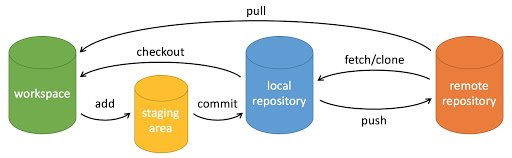
- workspace:工作区
- staging area:暂存区/缓存区
- local repository:版本库或本地仓库
- remote repository:远程仓库
Git配置
读取三个级别配置
git config --global --list
git config --system --list
git config --local --list
打开终端,依次输入
git config --global http.proxy http://127.0.0.1:7890
git config --global https.proxy https://127.0.0.1:7890
关闭
git config --global --unset http.proxy
git config --global --unset https.proxy
配置ssh
git config --global user.name "Codebells"
git config --global user.email "1347103071@qq.com"
#生成rsa密钥
ssh-keygen -t rsa -C "1347103071@qq.com"
#查看公钥
cat ~/.ssh/id_rsa.pub
git remote set-url origin https://<your_token>@github.com/<USERNAME>/<REPO>.git
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
Git不拉取代码新建远程分支上传本地代码
git init
git remote add origin https://github.com/Codebells/Codebells.github.io.git
git remote -v
git add .
git commit -m "test"
git checkout -b testBranch
git push origin remoteBranch
Git拉取指定分支代码
git clone -b SourceCode https://github.com/Codebells/Codebells.github.io.git多机协作
远程仓库有一个分支SourceCode,节点1本地代码是从该仓库clone下来的,修改后,如果远程仓库已经更新。则进行如下操作。
git add .
git commit -m "message"
git pull origin SourceCode
git push origin SourceCode
查看本地分支与远程分支关系
git remote show origin
git branch -vv
cat .git/config
关联远程分支
git remote add origin <resp address>
# 记得不是git add remote!
git branch --set-upstream-to localBranch origin/branch
重建博客
安装Hexo
git clone -b SourceCode https://github.com/Codebells/Codebells.github.io.git
npm install
git pull origin SourceCode
CentOS升级
yum install curl-devel expat-devel gettext-devel openssl-devel zlib-devel asciidoc
yum install  gcc perl-ExtUtils-MakeMaker
yum remove git
cd /usr/local/src/
wget https://www.kernel.org/pub/software/scm/git/git-2.37.1.tar.xz
tar -vxf git-2.37.1.tar.xz
cd git-2.37.1/
make prefix=/usr/local/git all
make prefix=/usr/local/git install
echo "export PATH=$PATH:/usr/local/git/bin" >> /etc/profile
source /etc/profile
git --versionGit常用指令
https://codebells.github.io/post/git.html